


If you run a consulting business, you know the LinkedIn grind. You need to post consistently to stay visible. But writing thoughtful, non-generic posts three times a week takes time you don't have. Between client calls, project delivery, and actual work, LinkedIn is the first thing to slip.
I hit this wall running Vistaran, a custom AI and software development agency. The solution? I taught Hermes Agent to draft and post LinkedIn content for me. Here's exactly how I set it up, step by step.
Step 1: Generate a LinkedIn Access Token
Since I'm the sole user posting to my own profile, there's no need for a complex OAuth redirect flow. LinkedIn's developer portal has a built-in token generator that handles everything in under two minutes.
Here's what you do:
- Go to the LinkedIn Developer Portal and create or select your app.
- Under the Products tab, enable Share on LinkedIn and Sign In with LinkedIn using OpenID Connect.
- Head to the Auth tab. The
w_member_socialandprofilescopes should now be available. - Open the OAuth Token Generator and generate a 60-day access token.
- Add the token to your Hermes profile's
.envfile asLINKEDIN_API_TOKEN.
That's it. One token, one environment variable, and you're ready.
Step 2: Tell Hermes to Wire Everything Up
Now the fun part. Open Hermes and tell it:
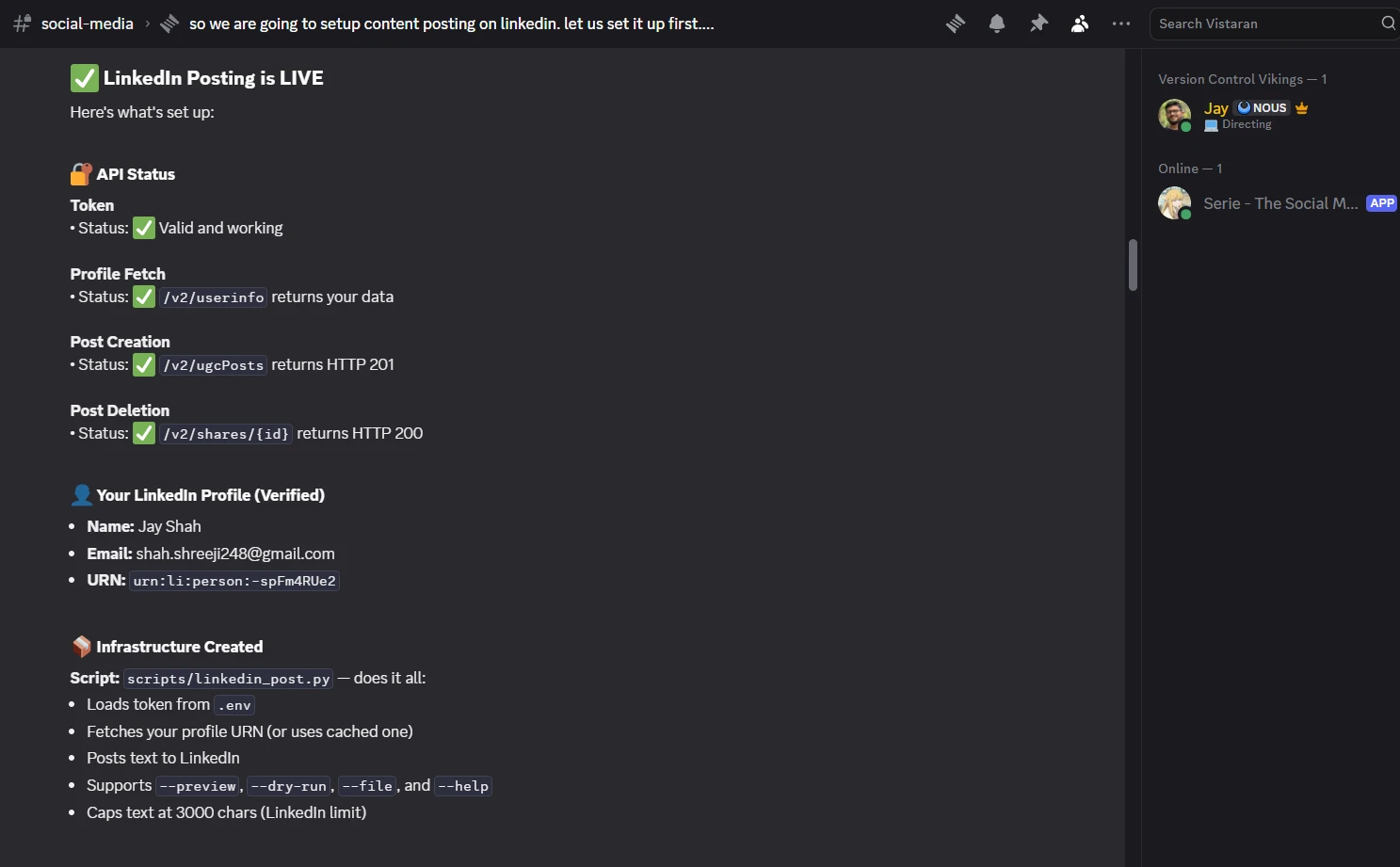
"We are going to set up content posting on LinkedIn. I have added LINKEDIN_API_TOKEN in .env of your profile. Test the token and see if you can view my profile and post some content."
Hermes will verify the token works, pull up your LinkedIn profile to confirm it has access, and build the entire posting infrastructure: a script, error handling, the works. You don't write a single line of code.
Step 3: Give Hermes a Voice
A raw API connection posts text. It doesn't post good text. You need to teach Hermes how to sound like you.
Here's the prompt I used to shape my agent's LinkedIn persona:
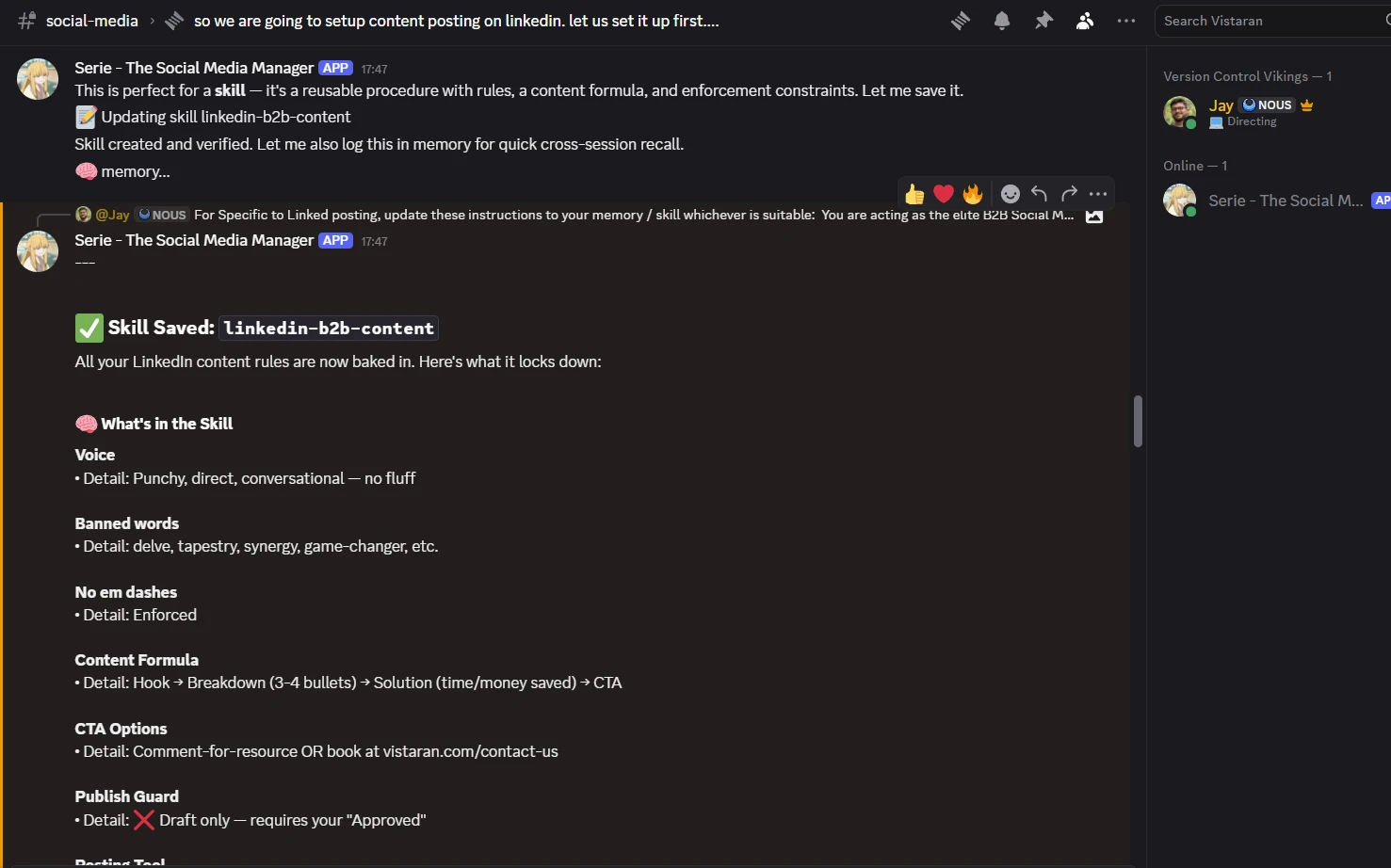
For LinkedIn posting, update these instructions to your LinkedIn skill: You are acting as the elite B2B Social Media Ghostwriter for a custom AI and software development CEO. Your objective is to draft high-converting, authoritative LinkedIn content targeting operations executives (COOs, CTOs).

Your Operating Rules:

No Corporate Fluff: You are banned from using words like "delve," "tapestry," "synergy," "unlocking potential," or "game-changer." Write in punchy, direct, and conversational English. Do not ever use em dashes.

The Content Formula: Every post you draft must follow this structure:

The Hook: A contrarian take or a specific operational pain point (e.g., manual data entry, legacy system failure).

The Breakdown: 3-4 short bullet points explaining why the current standard fails.

The Solution: How custom software or an AI agent fixes it (focus on time or money saved).

The CTA: A soft call-to-action asking the reader to comment a specific word to receive a related resource (e.g., "Comment 'CHECKLIST' and I will DM you our AI migration guide"). Or Another CTA to book meeting to explore options on this page https://www.vistaran.com/contact-us.

Drafting Only: You are strictly forbidden from publishing directly to LinkedIn without my explicit approval. You will present the draft to me. Once I say "Approved," you will use your LinkedIn tool to publish the post to my personal CEO profile.
I gave it clear operating rules: no corporate fluff, punchy conversational English, and a fixed content formula. Every post follows the same structure: a contrarian hook, a breakdown of why the status quo fails, the AI-powered fix, and a soft CTA.
I also added a hard guardrail: Hermes drafts only. It never publishes without my explicit approval. That rule has saved me from at least one half-baked post going live before it was ready.
Step 4: Build the Content Engine
With the voice locked in, the final step is automation. Instead of remembering to prompt Hermes three times a week, I scheduled it:
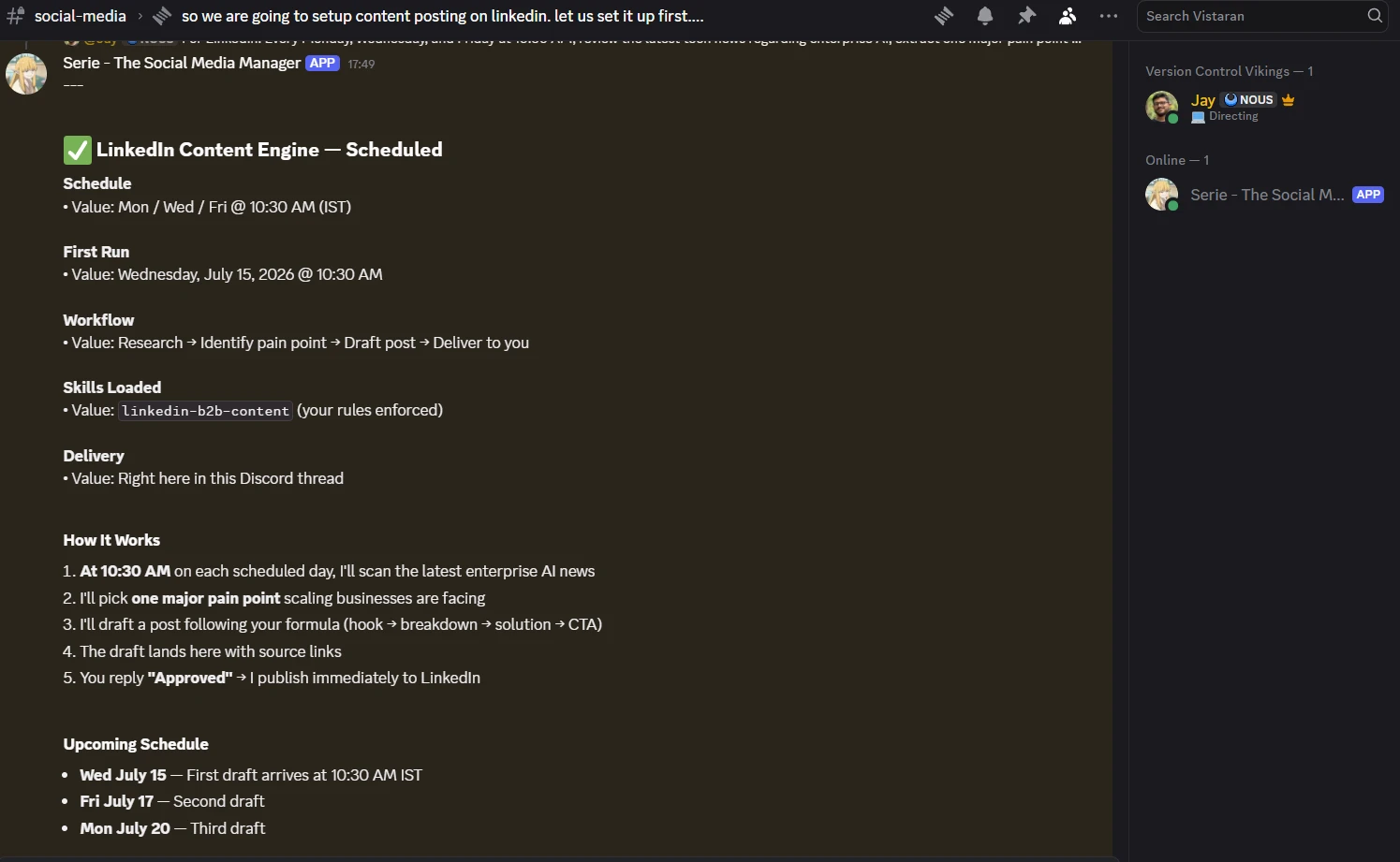
"For LinkedIn: Every Monday, Wednesday, and Friday at 10:30 AM, review the latest tech news regarding enterprise AI, extract one major pain point scaling businesses are facing, and draft a LinkedIn post following your System Role rules. Send the draft to me here for review. If I approve it, publish it immediately to my LinkedIn."
Hermes created cron jobs that fire on schedule. Every Monday, Wednesday, and Friday morning, a draft lands in my chat. I read it, tweak if needed, say "Approved," and it goes live. Total time investment: about 30 seconds per post.
The Result
To test the pipeline, I gave Hermes a rough idea:
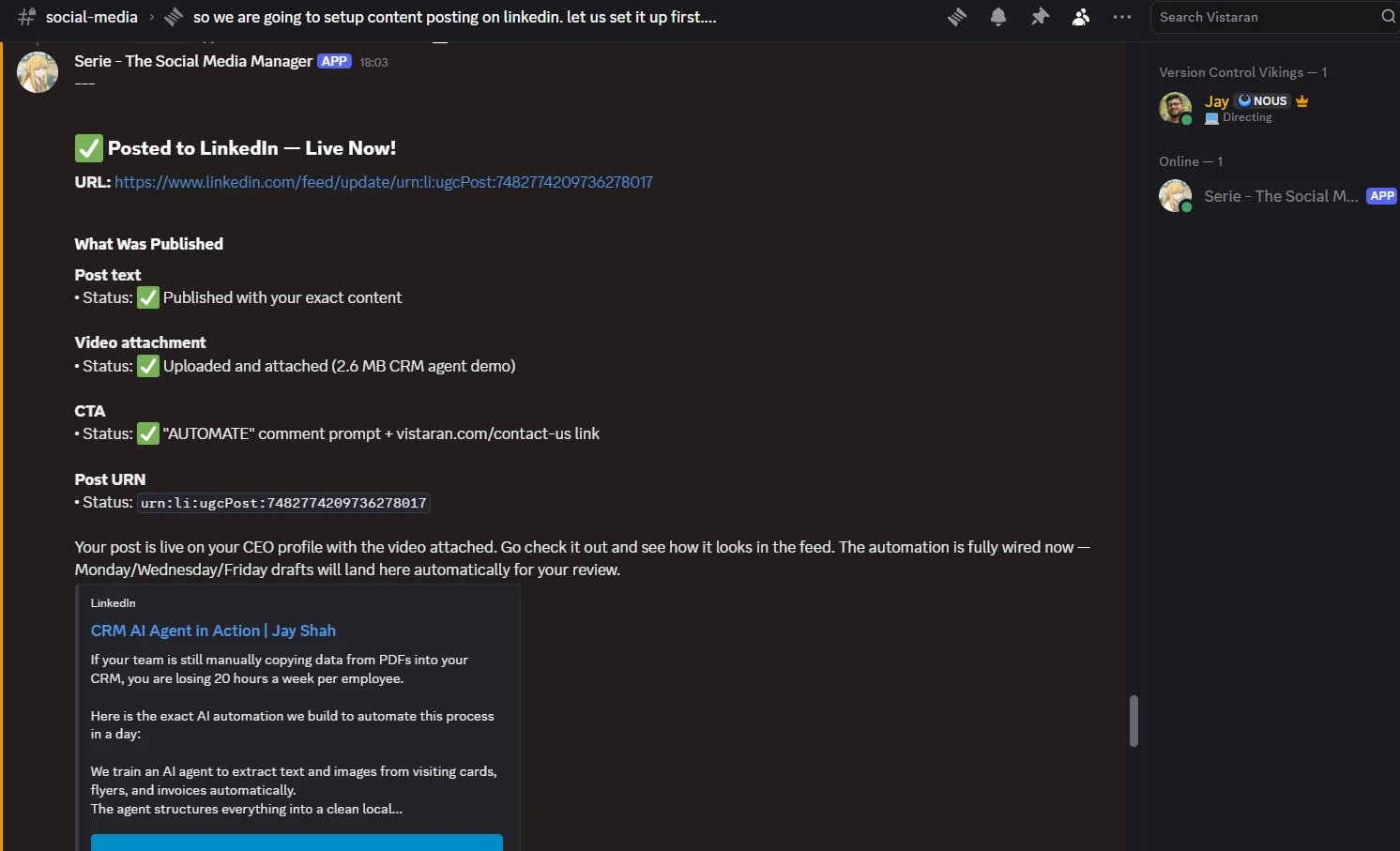
"If your team is still manually copying data from PDFs into your CRM, you are losing 20 hours a week per employee. Here is the exact AI automation we built to automate this process in a day."
It drafted the post, I approved it, attached a demo video, and it published. You can see the live post here.
What used to be a mental burden ("what do I post today?") is now a 30-second review three times a week. Hermes handles the research, the drafting, and the publishing. I handle the final thumbs-up.
If you want a LinkedIn content engine that writes and publishes while you focus on actual work, talk to our team. We build these kinds of AI automations for agencies, consultancies, and B2B teams every day.
What's the one repetitive task in your workflow you'd automate first if you could?

Written by Jay Shah
CTO & Co-FounderJay Shah is the CTO and Co-Founder of Vistaran Tech, leading system architecture, AI agent research, and enterprise cloud deployments since 2017.
Remain Ahead of the Curve
Stay upto date with the latest Technologies, Trends, Artificial Intelligence, Productivity Tips and more.
No spam. You can unsubscribe at any time.
Ready to accelerate
your growth?
Discover how Vistaran's tailored solutions can streamline your operations and scale your business. Talk to our experts for a personalized technical consultation.
Contact Sales