


The Problem
Managing HR operations for a growing team means juggling multiple tools: employees email leave requests to HR, someone manually updates spreadsheets, balances need to be tracked, and approvals need to be communicated back : all while keeping a paper trail. Every step is manual, repetitive, and error-prone.
I wanted an autonomous HR agent that could live in our company Discord, monitor the HR email inbox, process leave requests, update live spreadsheets, log everything to our knowledge base, and report back : completely hands-free.
This is the story of how I built Methode : The HR (the agent you're reading this from right now).
Section 1: Setting Up Hermes Agent with Discord
Before building the HR agent, I needed the AI framework to power it. I chose Hermes Agent by Nous Research : an open-source, provider-agnostic AI agent framework that runs across terminal, desktop, IDE, and messaging platforms like Discord.
I've covered the full Hermes + Discord setup in detail on a separate blog post:
Setting Up Hermes Agent with Discord: A Complete Guide
That guide walks through installing Hermes, creating a Discord bot application, configuring the gateway, setting your home channel, writing a persona via SOUL.md, and understanding profile memory limits. It also covers common pitfalls : like the Message Content Intent toggle that's the #1 reason bots stay silent in channels.
Windows users: Hermes runs inside Git Bash (MSYS2), not PowerShell. Hermes' built-in cron daemon and background processes work natively on Windows : no separate cron service to install. The detailed guide covers these platform-specifics.
Once Hermes was installed, connected to Discord, and running on DeepSeek V4 Flash, I moved on to connecting the Zoho ecosystem via MCP.
Section 2: Connecting Zoho MCP Servers
The core of the automation lives in Zoho's ecosystem : email for receiving leave requests, Sheets for tracking attendance, and WorkDrive for document storage. Hermes connects to all three through the Model Context Protocol (MCP) : an open standard that lets AI agents discover and call external tools automatically. Zoho MCP acts as a bridge, exposing Zoho Workspace apps as "Tools" that Hermes can use.
How to set it up:
- Log in to your Zoho account and navigate to the Zoho MCP platform.
- Create a Server: Create a new MCP server specifically for Zoho Mail or Zoho Workspace.
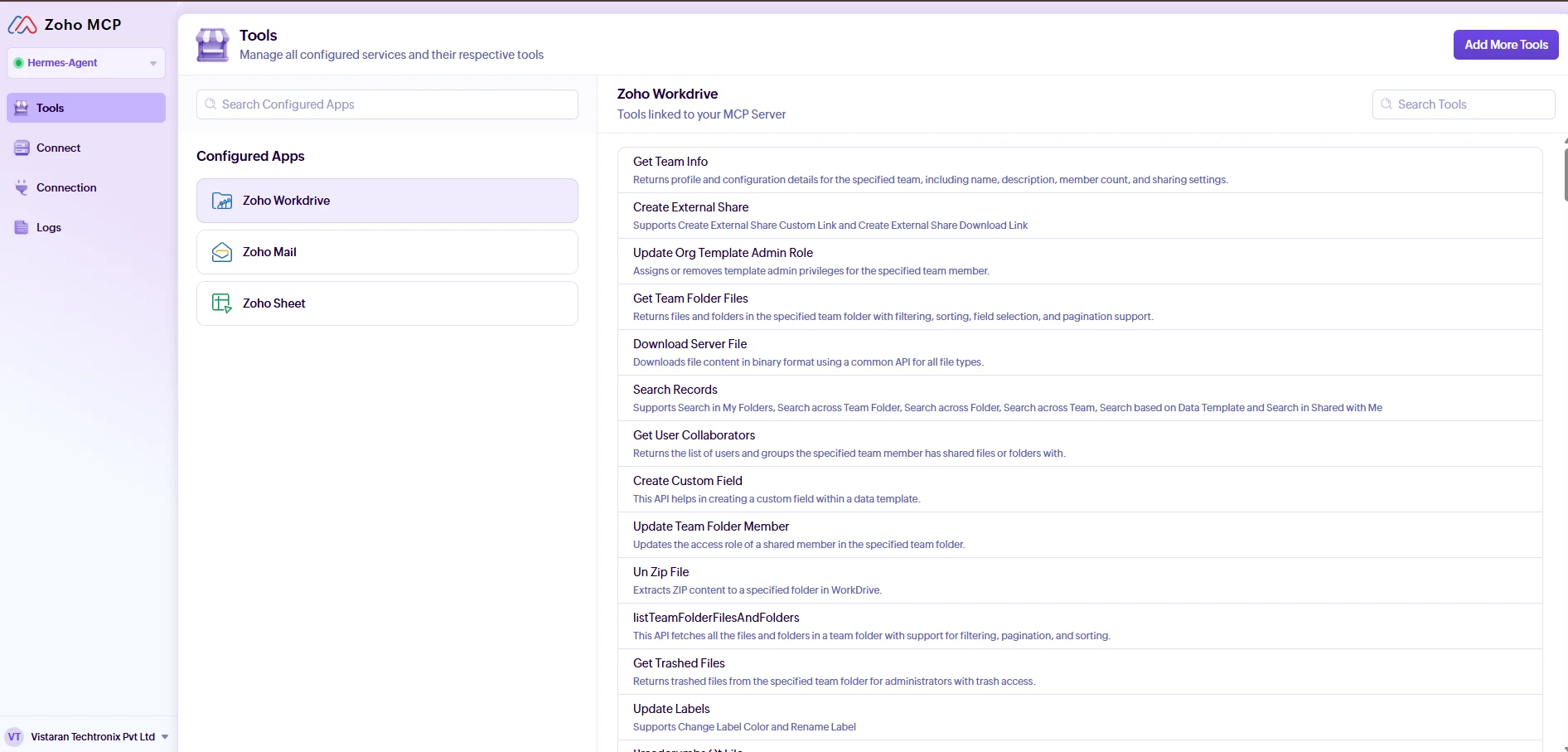
- Select Tools: Click Add Tools and select the specific actions Hermes is allowed to perform (e.g., reading emails, searching inbox, reading Workspace documents). Only grant the permissions Hermes needs for its HR duties.
- Get the Endpoint: Go to the Connect tab to get your MCP server endpoint URL.
- Connect to Hermes: Plug this URL into Hermes's MCP configuration. When Hermes tries to connect, it will prompt you for OAuth 2.0 authentication. This ensures Hermes acts on your behalf without ever seeing your actual password.
Step 1: Add the Zoho MCP Server
Prompt I used:
hermes mcp add zoho --auth oauth \
  --url https://hermes-agent-60079094013.zohomcp.in/mcp/***********/message \
  --connect-timeout 120
This triggers an OAuth flow in your browser. Log into your Zoho account and authorize the connection.
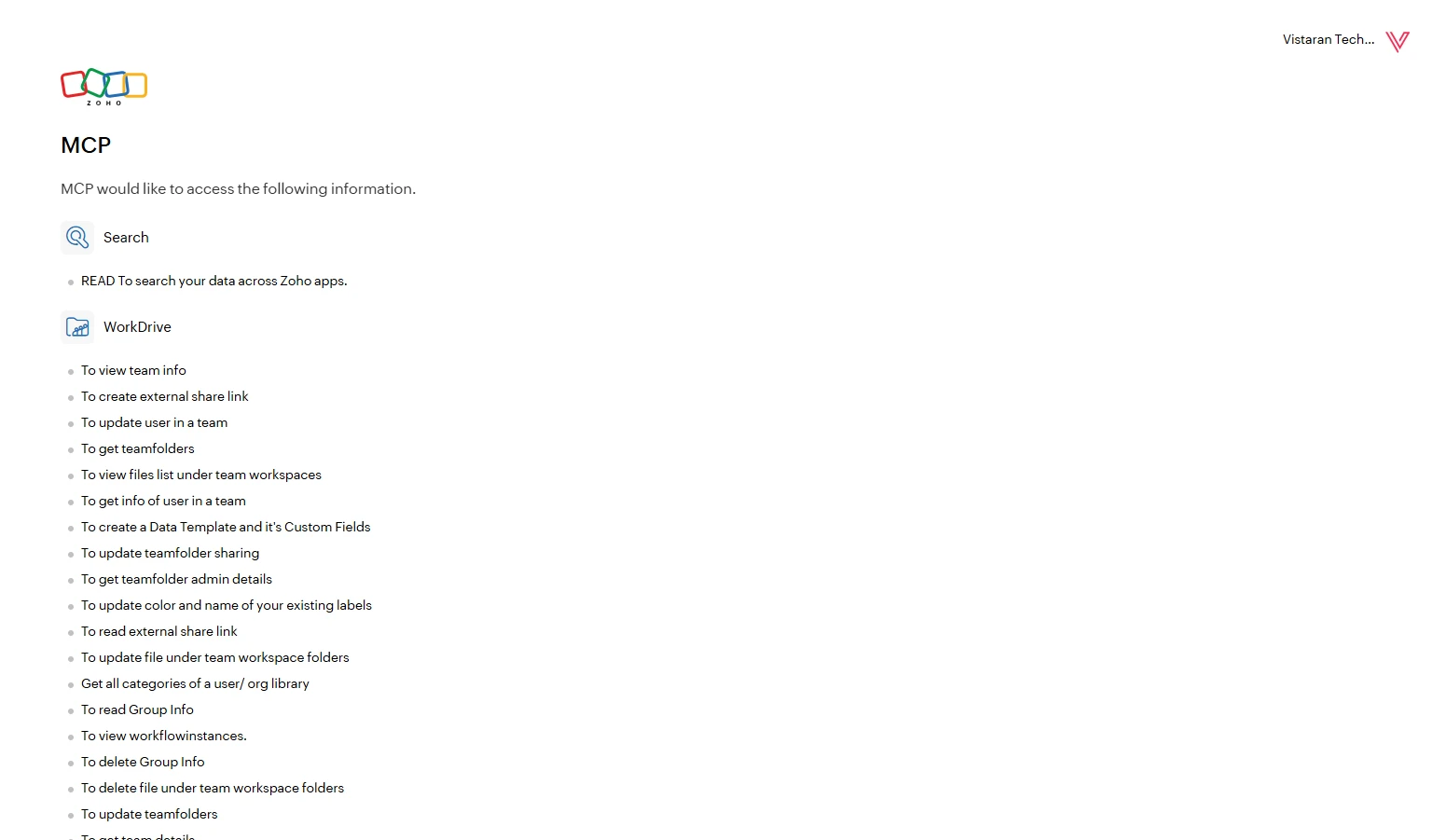
The --connect-timeout 120 is important : the default 60s isn't enough time to log into Zoho, find the authorize button, and click it.
Step 2: Fix the Sampling Protocol Mismatch
The Zoho MCP server uses a Java-based backend that doesn't understand the sampling.tools capability field Hermes sends during initialization. The connection fails silently with:
MCP server 'zoho' initial connection failed (attempt 3/3)
MCP server 'zoho' failed initial connection after 3 attempts, parking
Fix: Add sampling: enabled: false to the server config:
# In ~/.hermes/profiles/hr-manager/config.yaml
mcp_servers:
  zoho:
    url: "https://..."
    auth: oauth
    enabled: true
    sampling:
      enabled: false
Since Hermes blocks direct edits to config.yaml, I used this Python workaround:
cd ~/AppData/Local/hermes/profiles/hr-manager
python -c "
import yaml
with open('config.yaml', 'r') as f:
    config = yaml.safe_load(f)
config['mcp_servers']['zoho']['sampling'] = {'enabled': False}
with open('config.yaml', 'w') as f:
    yaml.dump(config, f, default_flow_style=False, allow_unicode=True)
"
Then reload MCP tools:
/reload-mcp
Step 3: Verify Tools Are Available
Once connected, I verified the tools by asking the agent:
Prompt I used:
"List all the Zoho MCP tools available to you right now."
The response showed three major service categories:
1. Zoho Mail Tools
| Tool | Purpose |
|---|---|
ZohoMail_listEmails | List inbox messages with filters |
ZohoMail_getMessageContent | Read full email body |
ZohoMail_sendReplyEmail | Reply on an email thread |
ZohoMail_fetchOrgUsersDetails | Get all organization users |
ZohoMail_addUser | Create new mail accounts |
2. Zoho WorkDrive Tools
| Tool | Purpose |
|---|---|
ZohoWorkdrive_getUserInfo | Current user details |
ZohoWorkdrive_getFileOrFolderDetails | Fetch file/folder metadata |
ZohoWorkdrive_Create_Folder | Create new folders |
ZohoWorkdrive_Upload_File | Upload files |
ZohoWorkdrive_searchTeamFoldersFiles | Search across team storage |
3. Zoho Sheet Tools
| Tool | Purpose |
|---|---|
ZohoSheet_get_content_of_worksheet | Read entire sheet data |
ZohoSheet_set_content_to_cell | Update individual cells |
ZohoSheet_add_records_to_worksheet | Add new rows |
ZohoSheet_update_records_in_worksheet | Update rows by criteria |
ZohoSheet_create_worksheet | Create new monthly sheets |
ZohoSheet_format_ranges | Apply formatting to cell ranges |
Step 4: Handle Proxy Routing Gaps (Zoho Mail Bypass)
I discovered that the Zoho MCP proxy only has routing rules for WorkDrive and Sheet APIs. Mail endpoints return:
{"errorCode": "URL_RULE_NOT_CONFIGURED"}
The workaround: Call the Zoho Mail v2 API directly using the same OAuth token stored by the MCP server.
Prompt I used:
"Read the Zoho OAuth token from mcp-tokens/zoho.json and try fetching inbox messages via the direct Zoho Mail API."
The token file (~/.hermes/profiles/hr-manager/mcp-tokens/zoho.json) contains:
{
  "access_token": "1000.xxxx...",
  "refresh_token": "1000.yyyy...",
  "expires_at": 1784523432,
  "token_type": "Zoho-oauthtoken"
}
The direct API call looks like:
curl -H "Authorization: Zoho-oauthtoken 1000.xxxx..." \
  "https://mail.zoho.in/api/v2/accounts/hr@vistaran.com/messages?limit=20"
Key difference: Direct Zoho REST APIs use
Authorization: Zoho-oauthtoken(notBearer). The MCP proxy usesBearer.
Step 5: OAuth Token Management
Zoho access tokens expire every ~1 hour. For hands-off automation, I set up an auto-refresh cron job:
Prompt I used:
"Create a cron job that runs every 45 minutes to reauthenticate Zoho MCP so the token stays fresh for the leave approval processor."
This keeps the token alive without manual intervention. If it does expire, the cron error report tells me exactly what to run:
❌ Zoho Mail API returned 401 INVALID_OAUTHTOKEN
   → Run: hermes mcp reauth zoho
???? Pro tip: Always check
expires_atinmcp-tokens/zoho.jsonbefore running automated tasks. The token expires silently : your first API call will 401.
Section 3: Connecting the Obsidian Vault
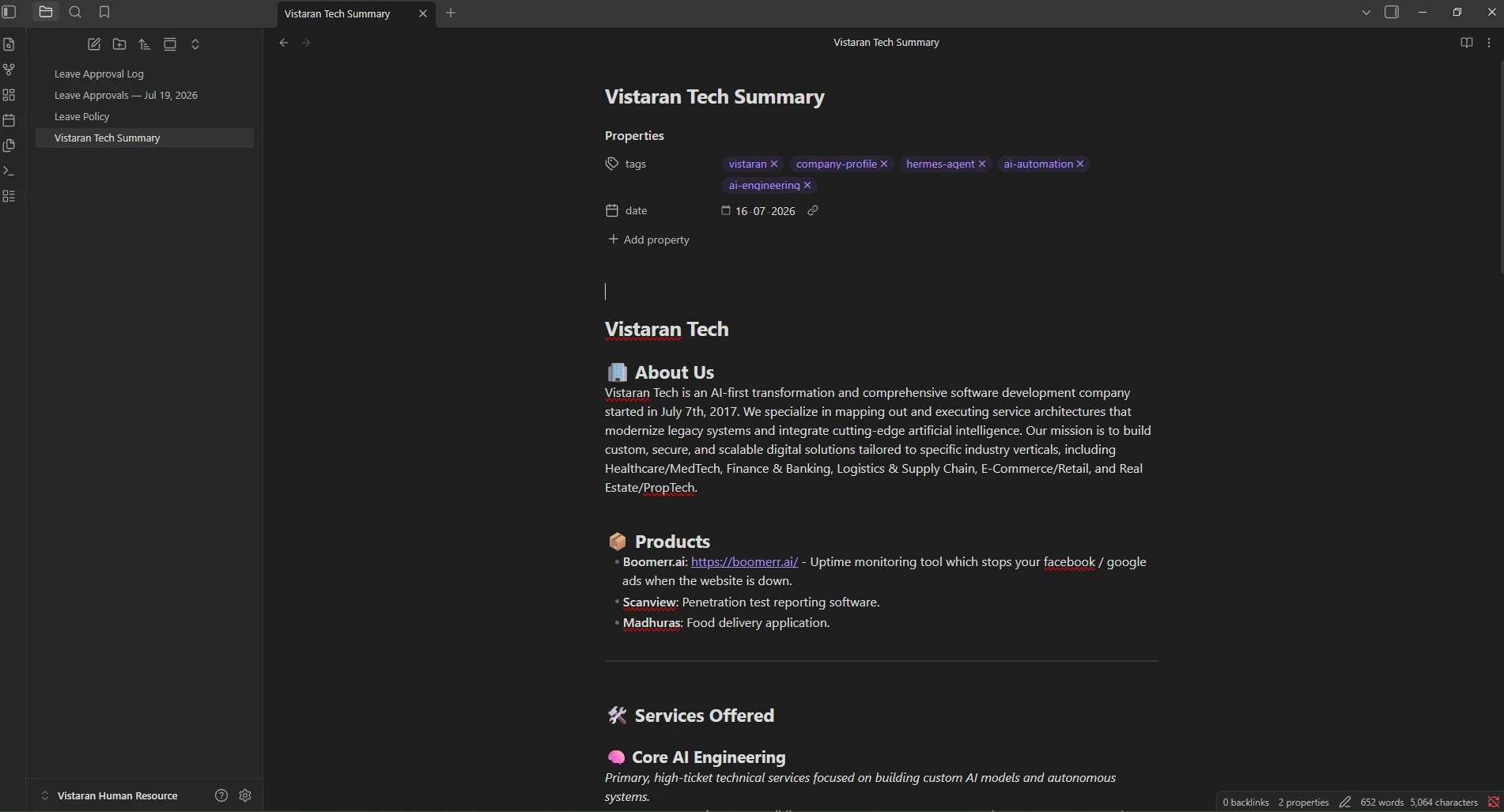
Every HR department has critical documents : leave policies, employee handbooks, onboarding checklists, approval logs. For our team, these live in a local folder at C:\Users\Jay\Documents\Vistaran Human Resource\.
What's in the Vault
| File | Purpose |
|---|---|
Leave Policy.md | Full attendance policy (12 sections) |
Leave Approval Log.md | Auto-generated log of every processed approval |
Leave Approvals : Jul 19, 2026.md | Manual backup of approval records |
Vistaran Tech Summary.md | Company overview and context |
Connecting the Vault (No API Needed)
The beauty of a local markdown vault is that no API integration is required. Hermes has direct file system access. I simply told the agent about the path:
Prompt I used:
"There's an Obsidian vault at C:\Users\Jay\Documents\Vistaran Human Resource\ with our leave policy and approval logs. Read the Leave Policy.md so you know the rules when processing requests."
The agent reads the policy on-demand:
policy = open("C:/Users/xxx/Documents/Vistaran Human Resource/Leave Policy.md").read()
And writes approval logs after each processing run:
entry = "| 20 Jul 2026 | 11:00 IST | Mittal Khatri | L | Approved | Vac: 7d, Sick: 4.5d |"
with open("C:/Users/xxx/Documents/Vistaran Human Resource/Leave Approval Log.md", "a") as f:
    f.write(entry + "\n")
Why a Local Vault Works Best
| Requirement | How It's Met |
|---|---|
| Markdown-native | Agent reads/writes .md files directly |
| No API dependency | File system access : zero tokens, zero auth |
| Version controlled | Git backup or Obsidian Sync |
| Searchable | Obsidian search + Hermes session search |
You don't even need Obsidian specifically. Any folder of markdown files works the same way.
Section 4: Testing Leave Approval with a Prompt
Before automating, I tested the full workflow manually through natural language prompts. Here's exactly what happened.
The Test
I asked the agent:
Prompt I used:
"Check the HR email inbox for any leave requests from today. If you find one, process it: log the leave in the Zoho Sheet, reply with approval, and log it in Obsidian."
What the Agent Did (Step by Step)
1. Checked the Inbox
The agent called the Zoho Mail API directly (bypassing the MCP proxy):
GET https://mail.zoho.in/api/v2/accounts/hr@vistaran.com/messages?limit=20
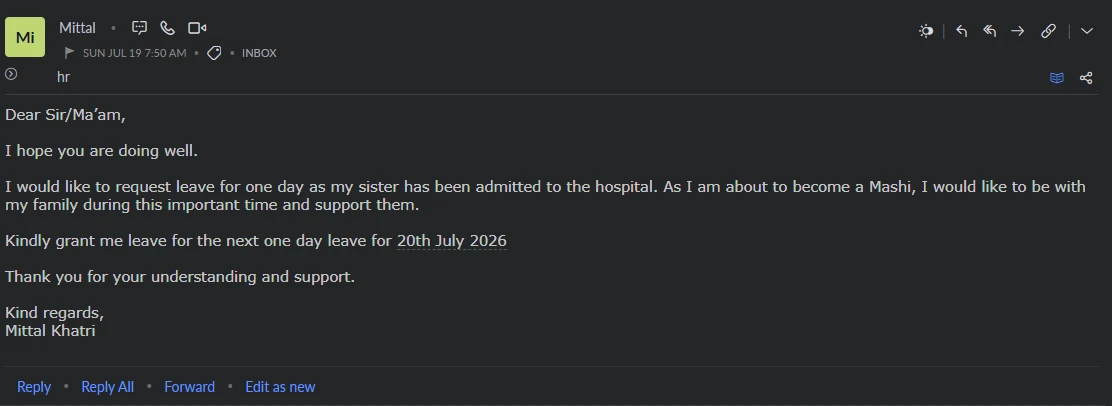
Found a leave request email from Mittal Khatri (m******@vistaran.com):
- Subject: "Leave Request : 20 July 2026"
- Message ID:
msg_xxxxx
2. Parsed the Request
| Field | Extracted Value |
|---|---|
| Employee | Mittal Khatri |
| m******@vistaran.com | |
| Leave Type | L (Full Day Leave) |
| Date | 20 July 2026 |
| Sheet Row | Row 9 (from employee roster) |
| Month Sheet | July 26 |
| Day Column | Column 21 (day 20 + 1) |
Employee-to-sheet mapping used:
| Employee | Sheet Row | |
|---|---|---|
| Vandanaba | v******@vistaran.com | Row 5 |
| Varun Umraliya | v******@vistaran.com | Row 8 |
| Mittal Khatri | m******@vistaran.com | Row 9 |
| Het Patel | h******@vistaran.com | Row 10 |
| Harsh Kateliya | h******@vistaran.com | Row 11 |
3. Updated the Zoho Sheet
The agent called the MCP tool:
{
  "name": "ZohoSheet_set_content_to_cell",
  "arguments": {
    "path_variables": {
      "resource_id": "znge796e9e7f8b0164194b67df363bb3c0682",
      "setcontenttocell": "v2"
    },
    "query_params": {
      "method": "cell.content.set",
      "worksheet_name": "July 26",
      "row": 9,
      "column": 21,
      "content": "L"
    }
  }
}
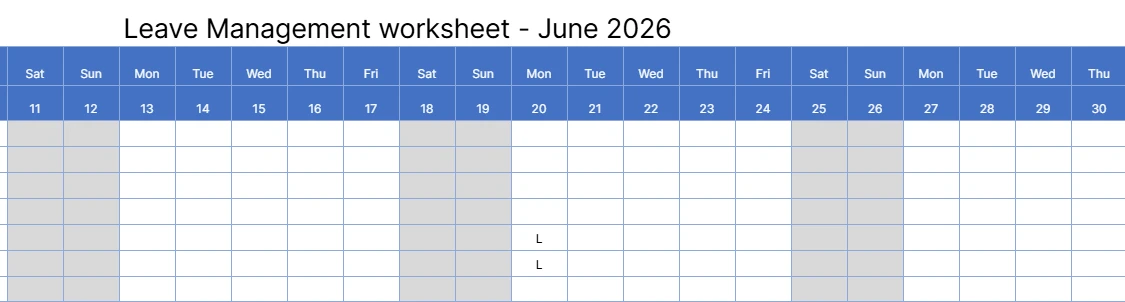
This placed an "L" in the cell for Mittal on 20 July.
4. Replied to the Email Thread
The agent sent an approval reply on the same email thread:
POST https://mail.zoho.in/api/v2/accounts/hr@vistaran.com/messages/msg_xxxxx/reply

Body:
"Hi Mittal,

Your half-day leave (L1) on July 20, 2026 has been recorded.

Current leave balance:
 - Vacation Leave Remaining: 6.5 days (of 12 yearly)
 - Sick Leave Remaining: 4.5 days (of 6 yearly)

Please reach out for any corrections.

Best regards,
HR Team Vistaran Techtronix
"
Here is the screenshot of the actual email that was sent.

5. Logged to Obsidian
Appended this row to Leave Approval Log.md:
| 20 Jul 2026 | 11:02 IST | Mittal Khatri | L | Full Day Leave | ✅ Approved | Vac: 7d, Sick: 4.5d |
Leave Code Reference
| Code | Meaning | Example Subject |
|---|---|---|
| L | Full Day Vacation Leave | "Leave Request : 20 July" |
| L1 | Half Day Vacation Leave | "Half-Day Leave : 20 July" |
| S | Full Day Sick Leave | "Sick Leave : 20 July" |
| S1 | Half Day Sick Leave | "Half-Day Sick Leave : 20 July" |
Zoho Sheet Structure
The workbook znge796e9e7f8b0***** contains:
- 9 monthly sheets (April 26 → December 26)
- 1 Total Leave Balance Sheet (auto-calc via
COUNTIFformulas across all months)
Each monthly sheet layout:
| Row | Content |
|---|---|
| Row 1 | Month label (e.g. "July-2026") |
| Row 4 | Day numbers 1-31 (Columns B → AF) |
| Row 5 | Vandanaba's attendance row |
| Row 8 | Varun Umraliya's attendance row |
| Row 9 | Mittal Khatri's attendance row |
| Row 10 | Het Patel's attendance row |
| Row 11 | Harsh Kateliya's attendance row |
| Col AG | Vacation total (auto formula) |
| Col AH | Sick total (auto formula) |
Section 5: Cron Job : Leave Approval Automation
Once the manual workflow was verified, I turned it into a fully autonomous cron job.
Creating the Cron Job
Prompt I used:
"Create a scheduled cron job named 'Leave Approval Processor' that runs Monday to Friday at 11am and 5pm IST. It should check Zoho Mail inbox for leave requests, update the Zoho Sheet, reply with approval, and log to Obsidian. Load the vistaran-leave-codes and mcp-server-integration skills."
The agent executed:
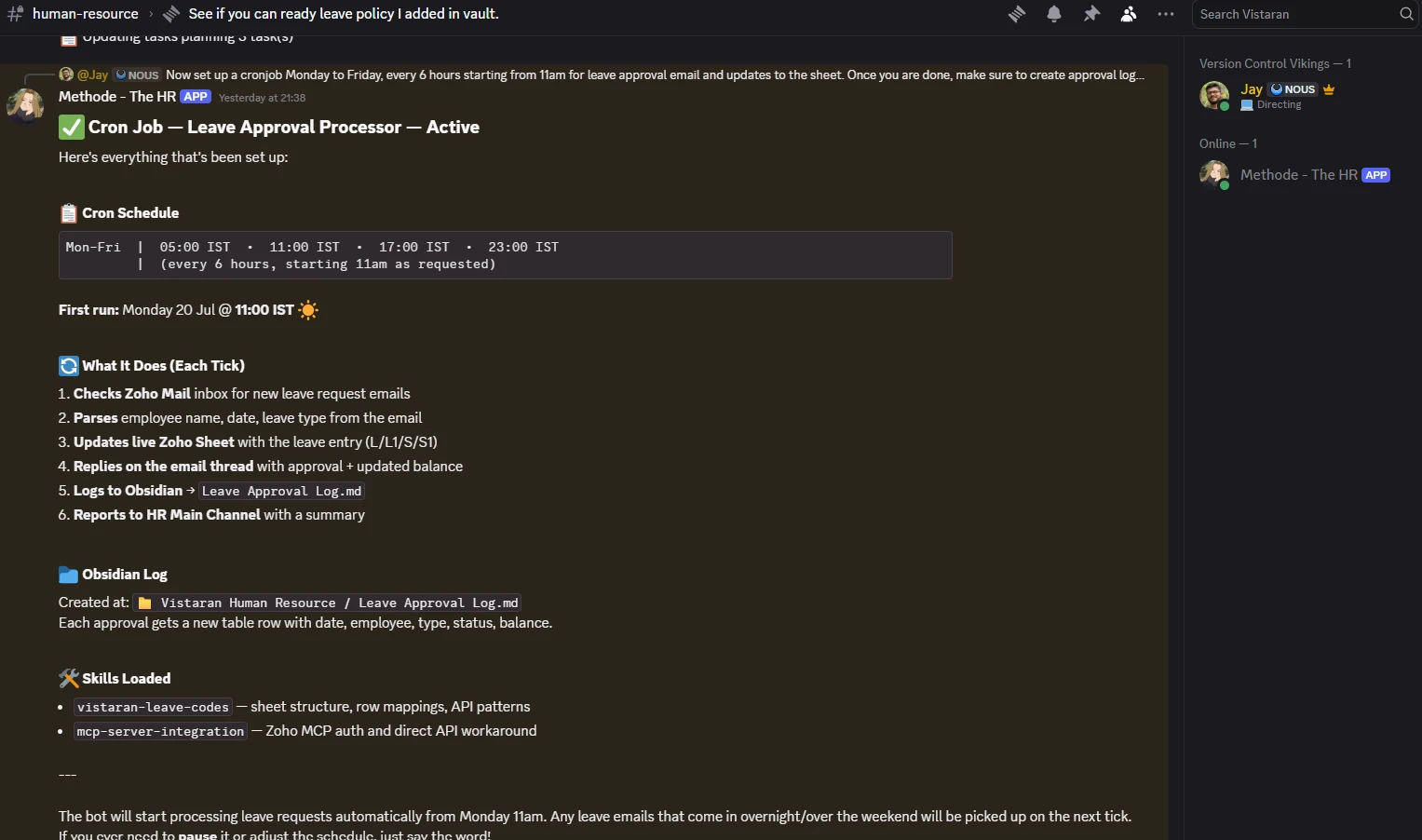
hermes cron create "0 11,17 * * 1-5" \
  --name "Leave Approval Processor" \
  --prompt "Check the HR inbox for leave requests. For each one found: \
parse the employee and date, update the Zoho Sheet, reply with approval, \
log to Obsidian, and report back to Discord." \
  --skills vistaran-leave-codes,mcp-server-integration \
  --deliver discord
Schedule
┌───────── Minute (0)
│ ┌─────── Hour (11, 17)
│ │ ┌───── Day of Month (*)
│ │ │ ┌─── Month (*)
│ │ │ │ ┌─ Day of Week (1-5 = Mon-Fri)
│ │ │ │ │
0 11,17 * * 1-5
Runs Monday-Friday at 11:00 IST and 17:00 IST.
Note: I initially set it to every 6 hours (5am → 11am → 5pm → 11pm) but adjusted it to twice daily. Early morning and late night notifications weren't useful.
What Happens Each Tick
- Read OAuth token from
mcp-tokens/zoho.json - Call Zoho Mail API → list inbox, filter by "leave" in subject
- Skip already-processed messages (messageId dedup)
- Parse: employee → sheet row, leave type → code (L/L1/S/S1), date → month + day column
- Update cell via
ZohoSheet_set_content_to_cellMCP tool - Reply on email thread with approval + updated balance
- Append to Obsidian
Leave Approval Log.md - Deliver report to Discord HR Main Channel
Skills That Power It
Two custom skills ensure the cron job knows the exact sheet structure, employee roster, and API call patterns:
vistaran-leave-codes: Leave code definitions, Zoho Sheet workbook ID, employee-to-row mapping, column formulas, MCP call patternsmcp-server-integration: Direct Zoho Mail endpoint format, OAuth token management, proxy bypass patterns
Error Handling
| Scenario | Behaviour |
|---|---|
| Token expired | Reports 401 INVALID_OAUTHTOKEN with fix instructions |
| Unknown employee | Skips and flags for manual review |
| Duplicate email | messageId filter prevents double-processing |
| Sheet API down | Falls back to reporting without sheet update |
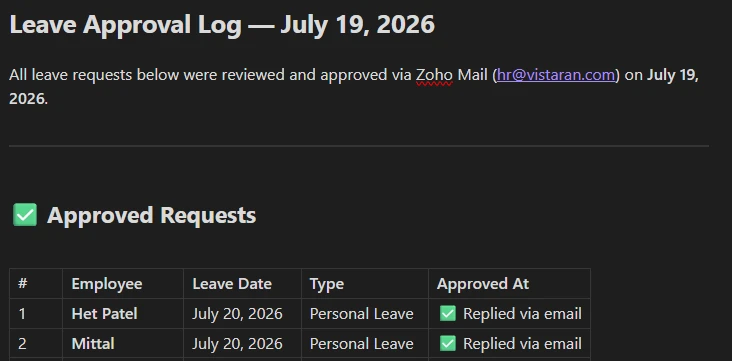
Cron Run Report (Discord)
Each run posts a clean summary to the HR Main Channel:
Section 6: Other HR Use Cases
The same architecture : Hermes Agent + Zoho MCP + local vault : unlocks several more automations. Here are the ones I'm running or have planned:
1. Automated Onboarding
Prompt I'd use:
"A new developer is joining next Monday. Create their Zoho Mail account, add a row to all monthly sheets with formulas, create an onboarding checklist in Obsidian, and send them a welcome email."
How it works:
ZohoMail_addUser: provisions the email accountZohoSheet_insert_row: adds the employee row across all 9 monthly sheets- File write to Obsidian : creates the onboarding task list
ZohoMail_sendEmail: sends the welcome package
2. Leave Balance Queries
Prompt I'd use (from an employee via Discord DM):
"How many leave days do I have remaining?"
The agent reads the Total Leave Balance Sheet via MCP and responds instantly with vacation and sick balances.
3. Monthly Attendance Reports
Prompt I'd use:
"Generate an attendance summary for June 2026. Read all employee rows from the June 26 sheet and compile a report."
The cron job can be extended to run on the 1st of every month, compiling totals and flagging anomalies.
4. Policy Document Retrieval
Prompt from an employee:
"What's the policy on sick leave notifications?"
The agent searches Leave Policy.md in Obsidian and responds with the exact policy section.
5. Critical Email Watchdog
A separate no-agent cron script monitors for:
- Resignation emails (subject: "resignation" / "resign")
- Escalation requests (subject: "URGENT" / "escalation")
- Policy violation reports
When detected, it immediately alerts the management channel.
6. Offer Letter Generation
Using Zoho Writer (via WorkDrive) + company templates in the vault, the agent can:
- Read the candidate details from an email
- Populate the offer letter template
- Save it to WorkDrive
- Share a review link with the manager
Putting It All Together
Here's the complete architecture : an employee sends an email, and the entire pipeline runs autonomously:
                  ┌──────────────────────────┐
                  │ Employee sends leave      │
                  │ request to hr@vistaran.com │
                  └───────────┬──────────────┘
                              │
                  ┌───────────▼──────────────┐
                  │  Hermes Cron Job          │
                  │  Mon-Fri · 11am / 5pm IST │
                  │  "Leave Approval Proc."   │
                  └───────────┬──────────────┘
                              │
         ┌────────────────────┼────────────────────┐
         ▼                    ▼                    ▼
 ┌───────────────┐   ┌───────────────┐   ┌───────────────┐
 │  Zoho Mail    │   │  Zoho Sheet   │   │ Obsidian      │
 │  (Direct API) │   │  (Via MCP)    │   │ (File System) │
 │               │   │               │   │               │
 │ • Read inbox  │   │ • Update cell │   │ • Log approval│
 │ • Reply reply │   │ • Read totals │   │ • Read policy │
 └───────┬───────┘   └───────┬───────┘   └───────┬───────┘
         │                   │                    │
         └───────────────────┼────────────────────┘
                             │
                  ┌──────────▼───────────┐
                  │   Discord Channel    │
                  │  "HR Main Channel"   │
                  │  (Summary report)    │
                  └─────────────────────┘
What Makes This Architecture Powerful
| Capability | How It's Achieved |
|---|---|
| Email monitoring | Zoho Mail API (direct, bypassing MCP proxy) |
| Sheet updates | Zoho Sheet MCP tools |
| Document storage | Obsidian vault at Documents/Vistaran Human Resource/ |
| Scheduling | Hermes built-in cron daemon |
| Notifications | Discord delivery to HR Main Channel |
| Agent identity | SOUL.md defines Methode's HR persona |
| Domain knowledge | Custom skills (vistaran-leave-codes) |
| Isolation | Separate hr-manager profile from personal agent |
Prerequisites Checklist
Before you start, make sure you have:
- Hermes Agent installed (
pip install hermes-agent) - Git Bash (Windows) or bash (Linux/macOS)
- Discord Bot Token from Discord Developer Portal
- Zoho account with Mail, Sheet, and WorkDrive access
- Zoho MCP URL from Zoho's developer console
- Obsidian vault (or any folder of
.mdfiles) for HR documents - HR email inbox configured (
hr@yourcompany.com)
What's Next
I'm planning to add:
- WhatsApp gateway so employees can request leave via WhatsApp
- Automated salary processing : reading monthly attendance for deduction calculations
- Holiday calendar sync : pulling official holidays into sheets automatically
- Manager approval chain : routing requests through department heads before final approval
Ready to build your own AI-powered HR automation? Contact us at https://vistaran.com/contact-us.

Written by Jay Shah
CTO & Co-FounderJay Shah is the CTO and Co-Founder of Vistaran Tech, leading system architecture, AI agent research, and enterprise cloud deployments since 2017.
Remain Ahead of the Curve
Stay upto date with the latest Technologies, Trends, Artificial Intelligence, Productivity Tips and more.
No spam. You can unsubscribe at any time.
Ready to accelerate
your growth?
Discover how Vistaran's tailored solutions can streamline your operations and scale your business. Talk to our experts for a personalized technical consultation.
Contact Sales